
Praxis Reference Manual

  • Welcome to Praxis
  • Installation
    • Hardware requirement
    • Supported file formats
    • Prerequisites
    • Server installation
    • Client installation
    • Change license
  • Configuration
    • Add/Remove machine
    • Setup tooling
    • Configure users
    • Language
    • Material
      • Add new material and sheet
      • Export/Import material
      • Replace material
    • Map material
    • Map CAM pages
    • Map fields from CAD (lookup keys)
  • The user interface
  • Workflow
  • Library
    • Open
      • Import parts
      • Import orders
      • Import jobs
      • Import assemblies
    • Library view
      • Parts
      • Assembly
    • Part status
      • Part validation
      • Part panel
      • Part filters
    • Tooling status
      • Tooling validation
        • Bend tooling validation
        • Cut tooling validation
        • Fold tooling validation
      • Tooling panel
    • Saving filters
  • Orders
    • Orders view
  • Jobs
    • Create job
    • Job view
    • Job panel
    • Auto plan
    • Interactive nesting
    • Repacking
    • Nest management
      • Layout view
      • Layout panel
      • Report sender
    • Remnant management
      • Auto remnant management
      • Manual remnant management
    • Twinline nesting
    • Out-of-date
    • Job filters
  • Factory
    • Routes
    • Sheets
    • Users
    • Edit
    • Customers
    • Settings
      • Environment
      • Import
      • Bend
      • Cut
      • Notifications
      • Watch
      • Job
      • Reports
  • Impressum
Configuration
/
Material
/
Export/Import material

Export/Import material

Using text format

To export inventory materials, navigate to factory → sheets, click Export/Import , select Export, choose .txt, and save it to the target folder.
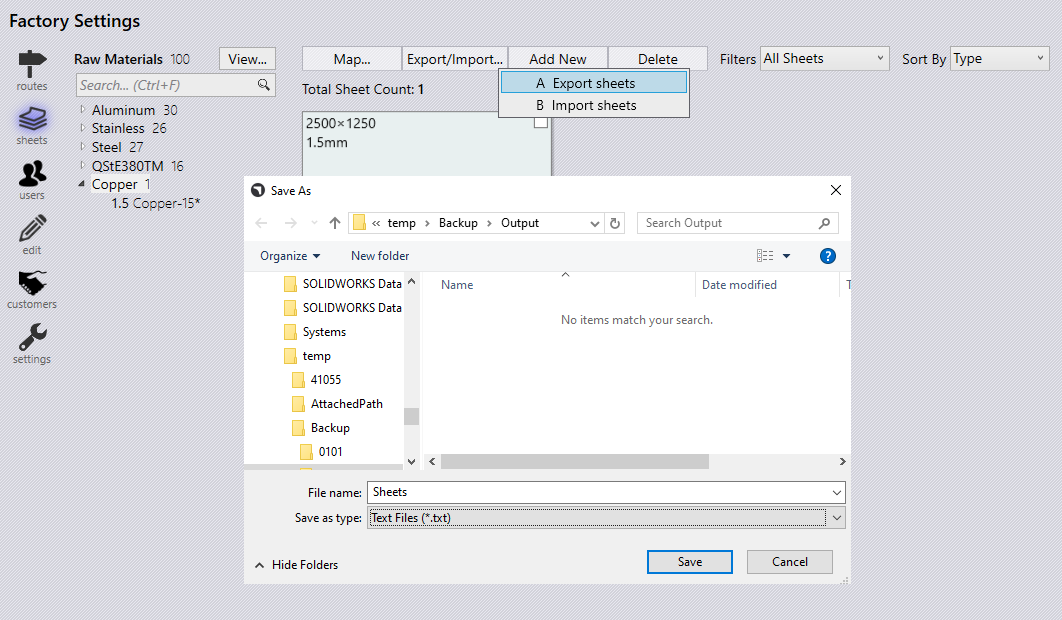
Export sheet Txt

Open the exported .csv file, add a new Raw Material and Sheet with the necessary details, then save the file.
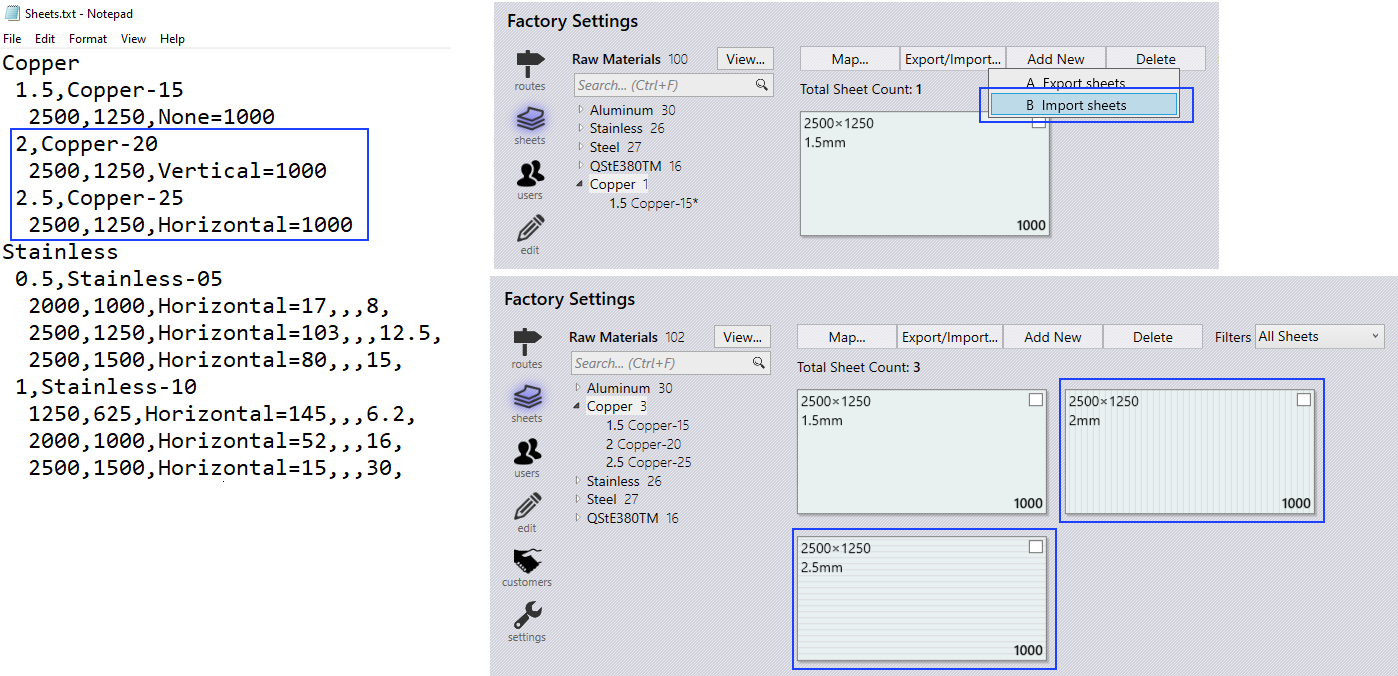
Import sheet Txt

To import the updated file, navigate to factory → sheets → Export/Import, select Import, choose the modified TXT file, and the newly added materials and sheets will appear in Praxis.
Using CSV format

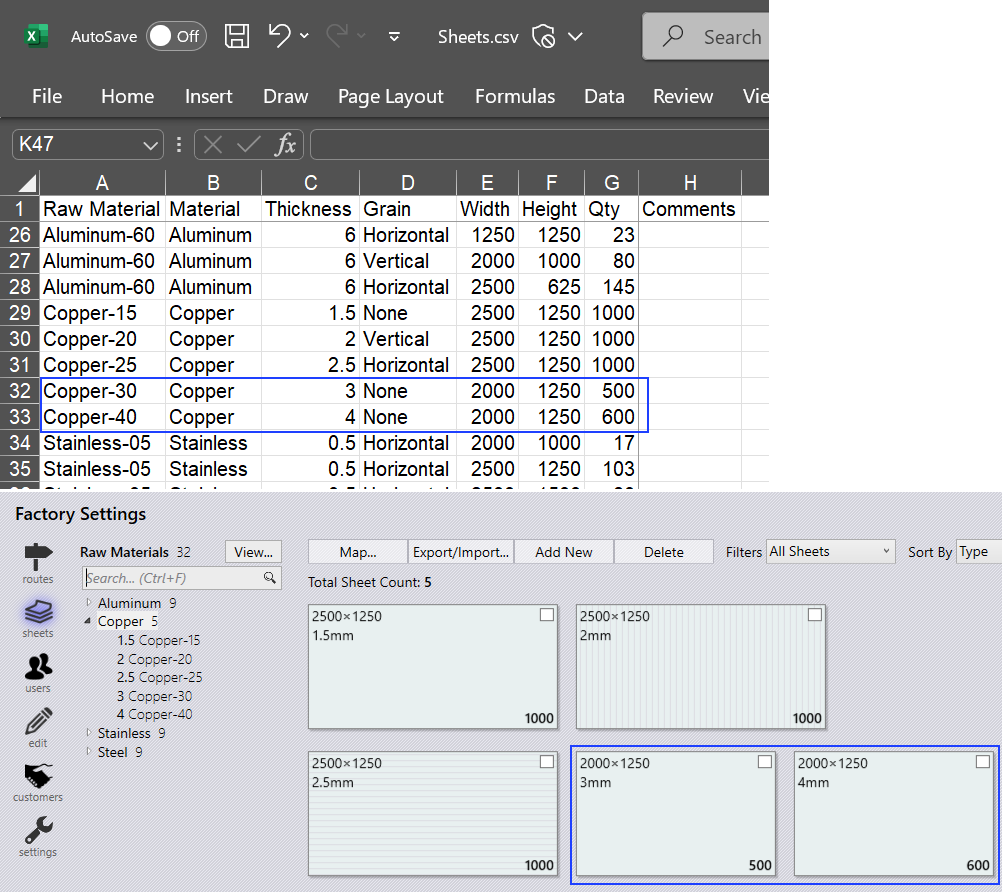
  • Click factory → sheets → Export/Import…​ → Export sheets. Choose CSV file and save to target folder.

  • Add sheets and sheet parameters, save the .csv file.

  • Using Import sheets, choose the modified .csv file.

  • Newly added materials and sheets will appear in Praxis.

Import sheet CSV

Material Import needs to be a specially constructed text based file that covers the following format. ; Material-Name=[BendMaterial],[Density],[FName]; RawMaterial-Thickness,[Name]=[Film],[Treatment],[Surface]; Sheet-Width,Height,Grain,Desc,HeatNumber=Qty,[Factory],[Shelf],[Cost],[Comments]

Example: Aluminum0.5,Aluminum-051500,1500,None,=112,,,22,2500,1250,Horizontal,=105,,,7,2500,1500,None,=100

To easily create an import file first export the materials and then make modifications to it or view the structure.

Contents

  • Using text format
  • Using CSV format
Add new material and sheet Replace material

      Copyright © 2025 TRUMPF Metamation. All rights reserved.

    Compiled by Bento