Map CAM pages
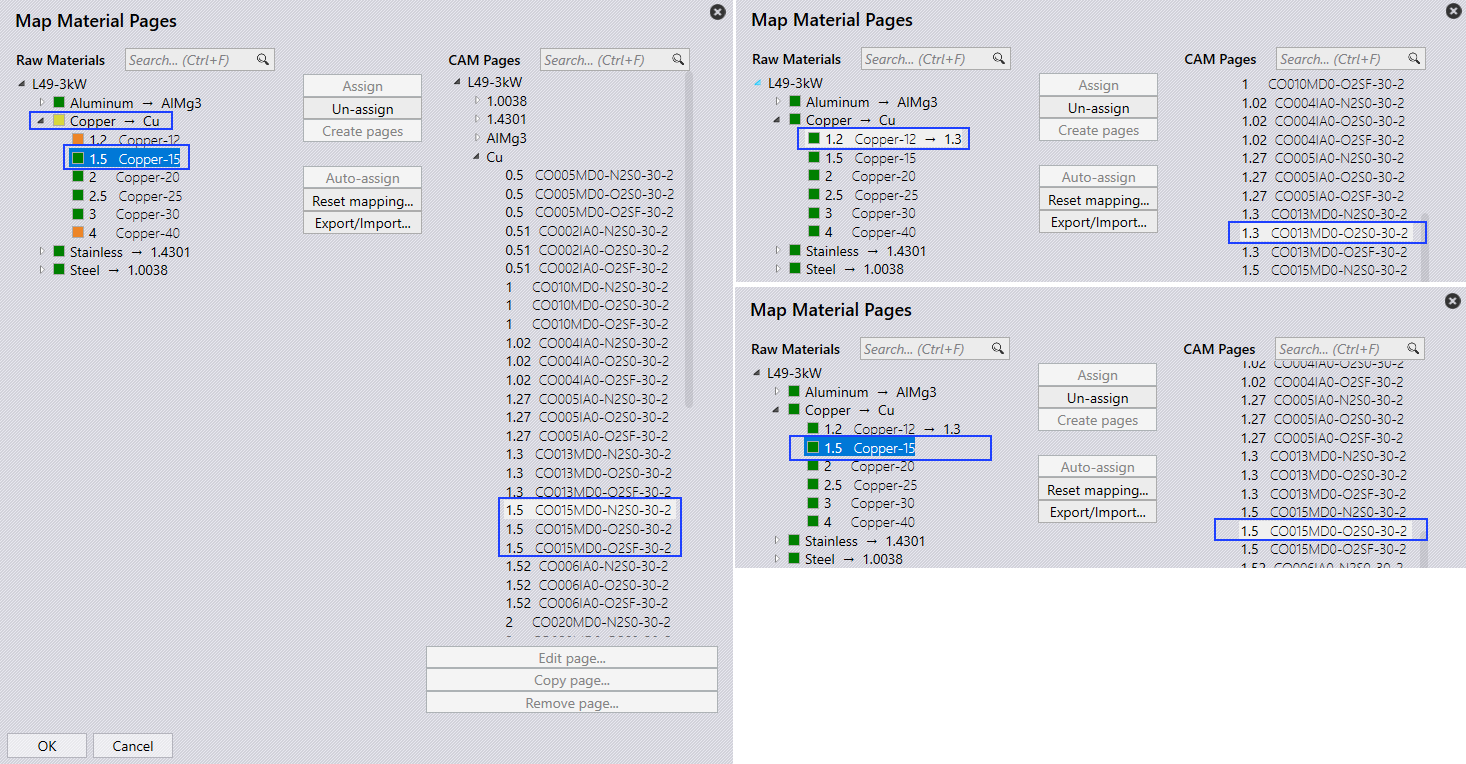
Go to factory → sheets → Map… → CAM Pages. The Map Material Pages screen appears.
-
Raw materials with mapped CAM pages are shown in GREEN, partially mapped or missing CAM pages in YELLOW, and unmapped raw materials in RED.
-
Auto-assign: When mapping raw material thickness against multiple LTT pages of the same thickness, the system maps to the first matching LTT, here Copper-15 (thickness 1.5) maps to the first LTT 1.5 [C0015MD0-N2S0-30-2].
-
Assign: Select Copper-15 and click Un-assign. Then choose LTT 1.5 [C0015MD0-O2S0-30-2].
-
If the correct LTT thickness is not found, the raw material is flagged in RED. The user must manually map Copper-12 (thickness 1.2) to the corresponding LTT thickness 1.3 [CO013MD0-O2S0-30-2].
| Before adding parts to the part library, ensure that CAM pages are mapped for all raw materials. |