
Praxis Reference Manual

  • Welcome to Praxis
  • Installation
    • Hardware requirement
    • Supported file formats
    • Prerequisites
    • Server installation
    • Client installation
    • Change license
  • Configuration
    • Add/Remove machine
    • Setup tooling
    • Configure users
    • Language
    • Material
      • Add new material and sheet
      • Export/Import material
      • Replace material
    • Map material
    • Map CAM pages
    • Map fields from CAD (lookup keys)
  • The user interface
  • Workflow
  • Library
    • Open
      • Import parts
      • Import orders
      • Import jobs
      • Import assemblies
    • Library view
      • Parts
      • Assembly
    • Part status
      • Part validation
      • Part panel
      • Part filters
    • Tooling status
      • Tooling validation
        • Bend tooling validation
        • Cut tooling validation
        • Fold tooling validation
      • Tooling panel
    • Saving filters
  • Orders
    • Orders view
  • Jobs
    • Create job
    • Job view
    • Job panel
    • Auto plan
    • Interactive nesting
    • Repacking
    • Nest management
      • Layout view
      • Layout panel
      • Report sender
    • Remnant management
      • Auto remnant management
      • Manual remnant management
    • Twinline nesting
    • Out-of-date
    • Job filters
  • Factory
    • Routes
    • Sheets
    • Users
    • Edit
    • Customers
    • Settings
      • Environment
      • Import
      • Bend
      • Cut
      • Notifications
      • Watch
      • Job
      • Reports
  • Impressum
Configuration
/
Configure users

Configure users

  • Praxis clients with different roles are used to control the factory configuration.

    • Adding new machines, materials and sheets.

    • Editing machine configurations.

    • Eding parts, jobs and assemblies.

    • Edit / Update nest sheets, Plan Job.

    • Add/Edit the users.

  • Pserver install PC consider as first Praxis user.

  • Praxis uses the windows credential as Praxis user name which is Site Admin [Superior user rights].

  • Next install ie., Praxis Client install computer username are considered as Programmer.
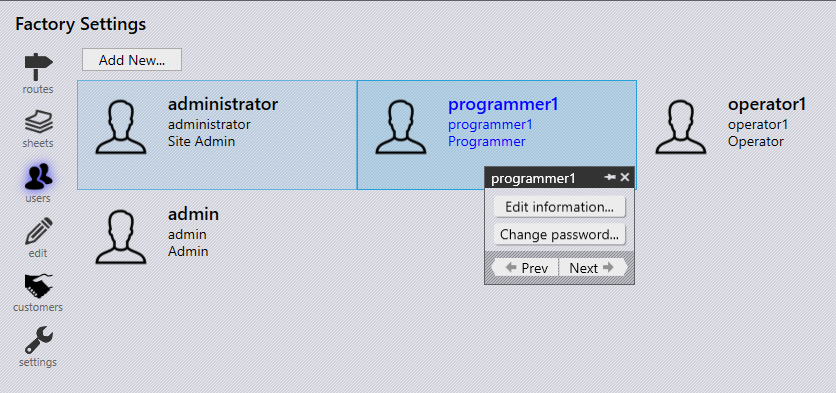
User roles
Only Site Admin can edit other user information and change the password.
Role Permission Denied

Site Admin

All Permissions

Admin

All programmer tasks, Edit Factory configuration

Edit users

Programmer

Upload and edit Parts/Jobs/Assemblies, Edit Part tooling, Sheet Inventory, Plan a Job

Edit Factory configuration, Edit users

Operator

Layout/Job complete, Add new sheet, Layout commands

Everything else denied.

Setup tooling Language

      Copyright © 2025 TRUMPF Metamation. All rights reserved.

    Compiled by Bento