
Praxis Reference Manual

  • Welcome to Praxis
  • Installation
    • Hardware requirement
    • Supported file formats
    • Prerequisites
    • Server installation
    • Client installation
    • Change license
  • Configuration
    • Add/Remove machine
    • Setup tooling
    • Configure users
    • Language
    • Material
      • Add new material and sheet
      • Export/Import material
      • Replace material
    • Map material
    • Map CAM pages
    • Map fields from CAD (lookup keys)
  • The user interface
  • Workflow
  • Library
    • Open
      • Import parts
      • Import orders
      • Import jobs
      • Import assemblies
    • Library view
      • Parts
      • Assembly
    • Part status
      • Part validation
      • Part panel
      • Part filters
    • Tooling status
      • Tooling validation
        • Bend tooling validation
        • Cut tooling validation
        • Fold tooling validation
      • Tooling panel
    • Saving filters
  • Orders
    • Orders view
  • Jobs
    • Create job
    • Job view
    • Job panel
    • Auto plan
    • Interactive nesting
    • Repacking
    • Nest management
      • Layout view
      • Layout panel
      • Report sender
    • Remnant management
      • Auto remnant management
      • Manual remnant management
    • Twinline nesting
    • Out-of-date
    • Job filters
  • Factory
    • Routes
    • Sheets
    • Users
    • Edit
    • Customers
    • Settings
      • Environment
      • Import
      • Bend
      • Cut
      • Notifications
      • Watch
      • Job
      • Reports
  • Impressum
Factory
/
Settings
/
Cut

Cut

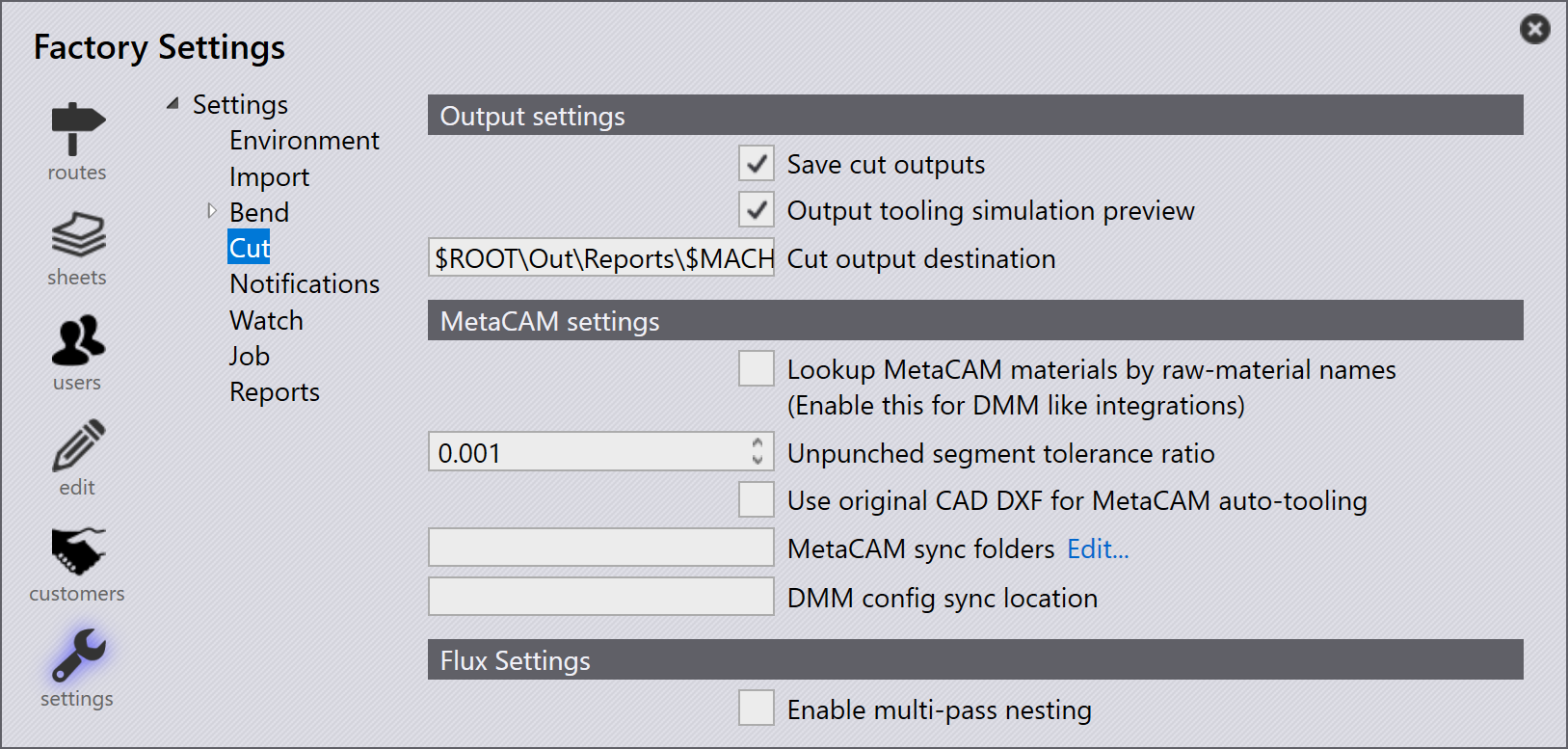
Cut settings

Output settings

Save cut outputs - The tooling results are saved only if the tooling is OK and these export settings are enabled and configured. Enable this option for the Cut NC to be saved.

Output tooling simulation preview - Enable this option to generate the tooling simulation preview along with the other outputs. This is a short GIF animation for the laser/punch tooling.

Cut output destination - This is the destination for the NC and reports to be saved.

MetaCAM settings

Lookup MetaCAM materials by raw-material names (Enable this for DMM-like integrations) - When this style is enabled, Praxis generates pages by raw-material names and assigns them to parts at the time of auto-tooling.

MetaCAM sync folders - This Cut setting is used to add additional MetaCAM folders which should be synchronized along with the config.dat when the config-push Monitor command is used. The config-push saves the local files to the Praxis repository which is downloaded on the other computers when MetaCAM (re)starts. The Engine computer should synchronize it automatically when the auto tooling is done for a MetaCAM machine apart from the Tools, some of the other installation-specific candidates are the Etc, Reports, and Machines folders.

DMM config sync location - This is the location for the Dynamic Machine Management config sync to be set.

Flux Settings

Enable multi-pass nesting - This will enable the laser to cut multiple times on the same contour (preferred for thicker material).

Contents

  • Output settings
  • MetaCAM settings
  • Flux Settings
Bend Notifications

      Copyright © 2025 TRUMPF Metamation. All rights reserved.

    Compiled by Bento