
Praxis Reference Manual

  • Welcome to Praxis
  • Installation
    • Hardware requirement
    • Supported file formats
    • Prerequisites
    • Server installation
    • Client installation
    • Change license
  • Configuration
    • Add/Remove machine
    • Setup tooling
    • Configure users
    • Language
    • Material
      • Add new material and sheet
      • Export/Import material
      • Replace material
    • Map material
    • Map CAM pages
    • Map fields from CAD (lookup keys)
  • The user interface
  • Workflow
  • Library
    • Open
      • Import parts
      • Import orders
      • Import jobs
      • Import assemblies
    • Library view
      • Parts
      • Assembly
    • Part status
      • Part validation
      • Part panel
      • Part filters
    • Tooling status
      • Tooling validation
        • Bend tooling validation
        • Cut tooling validation
        • Fold tooling validation
      • Tooling panel
    • Saving filters
  • Orders
    • Orders view
  • Jobs
    • Create job
    • Job view
    • Job panel
    • Auto plan
    • Interactive nesting
    • Repacking
    • Nest management
      • Layout view
      • Layout panel
      • Report sender
    • Remnant management
      • Auto remnant management
      • Manual remnant management
    • Twinline nesting
    • Out-of-date
    • Job filters
  • Factory
    • Routes
    • Sheets
    • Users
    • Edit
    • Customers
    • Settings
      • Environment
      • Import
      • Bend
      • Cut
      • Notifications
      • Watch
      • Job
      • Reports
  • Impressum
Factory
/
Settings
/
Environment

Environment

Environment settings

Environment settings

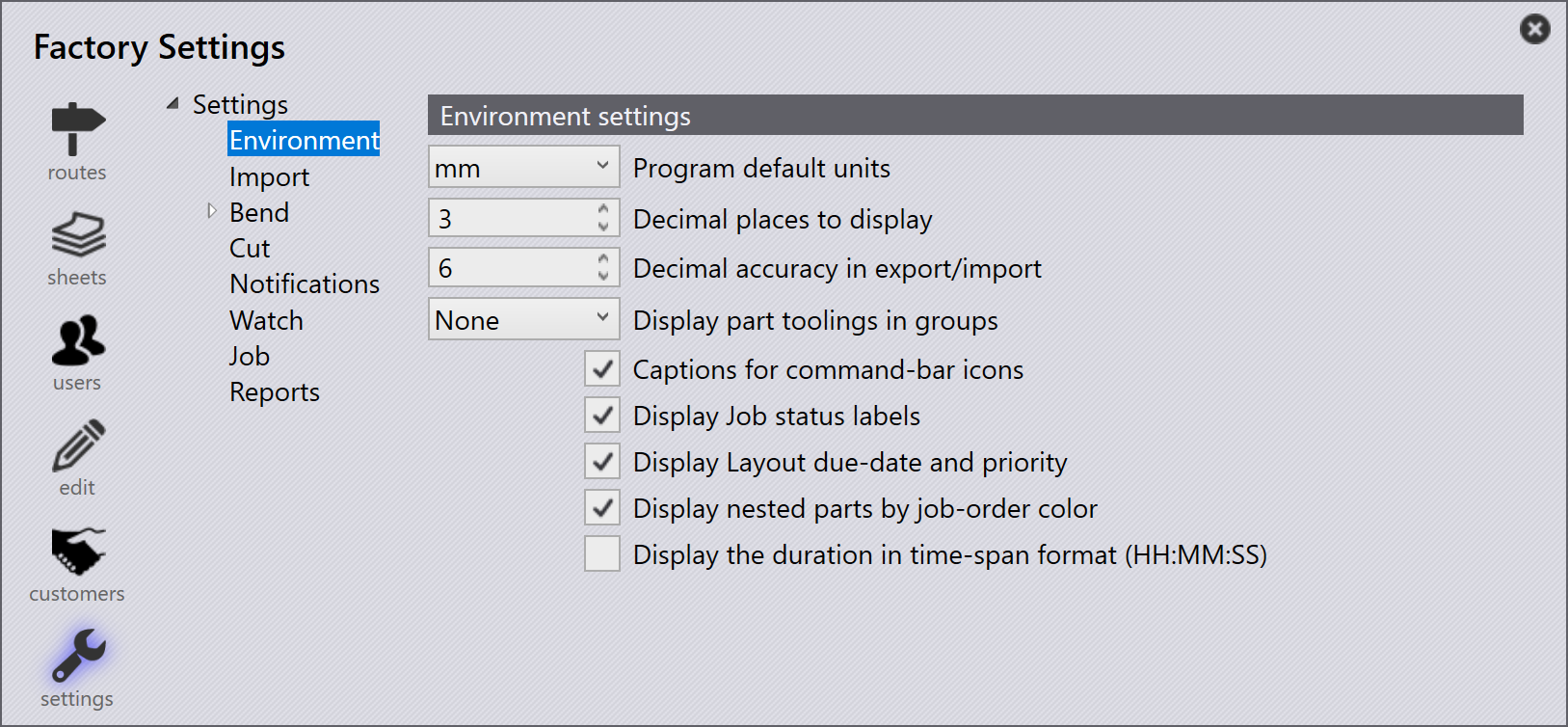
Program default units -The user can choose whether the default unit is mm or inch.

Decimal places to display - This value is to set how many decimal places are to be shown.

Decimal accuracy in export/import - This value is to set how many decimal places are to be exact when importing or exporting.

Display part toolings in groups - Use this option to select the tooling group for displaying the tooling status in the part library.

Captions for command-bar icons - Enabling this option will give a caption under each icon to reference what the page will refer to. When this option is disabled, all captions for the switches are removed and just the icon for each different page is displayed.

Display Job status labels - Enabling this option will display the number of parts which are within a job at the end of the Job status bar. When this option is disabled the part count is removed, and the colour to display the process will remain.

Display nested parts by job-order color - This option will display each different part within a Job as a different colour. Disabling this option all parts will be displayed in the same grey colour.

Display the duration in time-span format(HH:MM:SS) - Check this option to display the duration in HH:MM:SS format. When enabled, duration in the layout details and the job/layout reports are displayed in the selected format. Due to the space constraints, the duration is displayed in a more compact seconds format, on the layout tiles.

Contents

  • Environment settings
Settings Import

      Copyright © 2025 TRUMPF Metamation. All rights reserved.

    Compiled by Bento