
Praxis Reference Manual

  • Welcome to Praxis
  • Installation
    • Hardware requirement
    • Supported file formats
    • Prerequisites
    • Server installation
    • Client installation
    • Change license
  • Configuration
    • Add/Remove machine
    • Setup tooling
    • Configure users
    • Language
    • Material
      • Add new material and sheet
      • Export/Import material
      • Replace material
    • Map material
    • Map CAM pages
    • Map fields from CAD (lookup keys)
  • The user interface
  • Workflow
  • Library
    • Open
      • Import parts
      • Import orders
      • Import jobs
      • Import assemblies
    • Library view
      • Parts
      • Assembly
    • Part status
      • Part validation
      • Part panel
      • Part filters
    • Tooling status
      • Tooling validation
        • Bend tooling validation
        • Cut tooling validation
        • Fold tooling validation
      • Tooling panel
    • Saving filters
  • Orders
    • Orders view
  • Jobs
    • Create job
    • Job view
    • Job panel
    • Auto plan
    • Interactive nesting
    • Repacking
    • Nest management
      • Layout view
      • Layout panel
      • Report sender
    • Remnant management
      • Auto remnant management
      • Manual remnant management
    • Twinline nesting
    • Out-of-date
    • Job filters
  • Factory
    • Routes
    • Sheets
    • Users
    • Edit
    • Customers
    • Settings
      • Environment
      • Import
      • Bend
      • Cut
      • Notifications
      • Watch
      • Job
      • Reports
  • Impressum
Factory
/
Settings
/
Reports

Reports

Reports settings

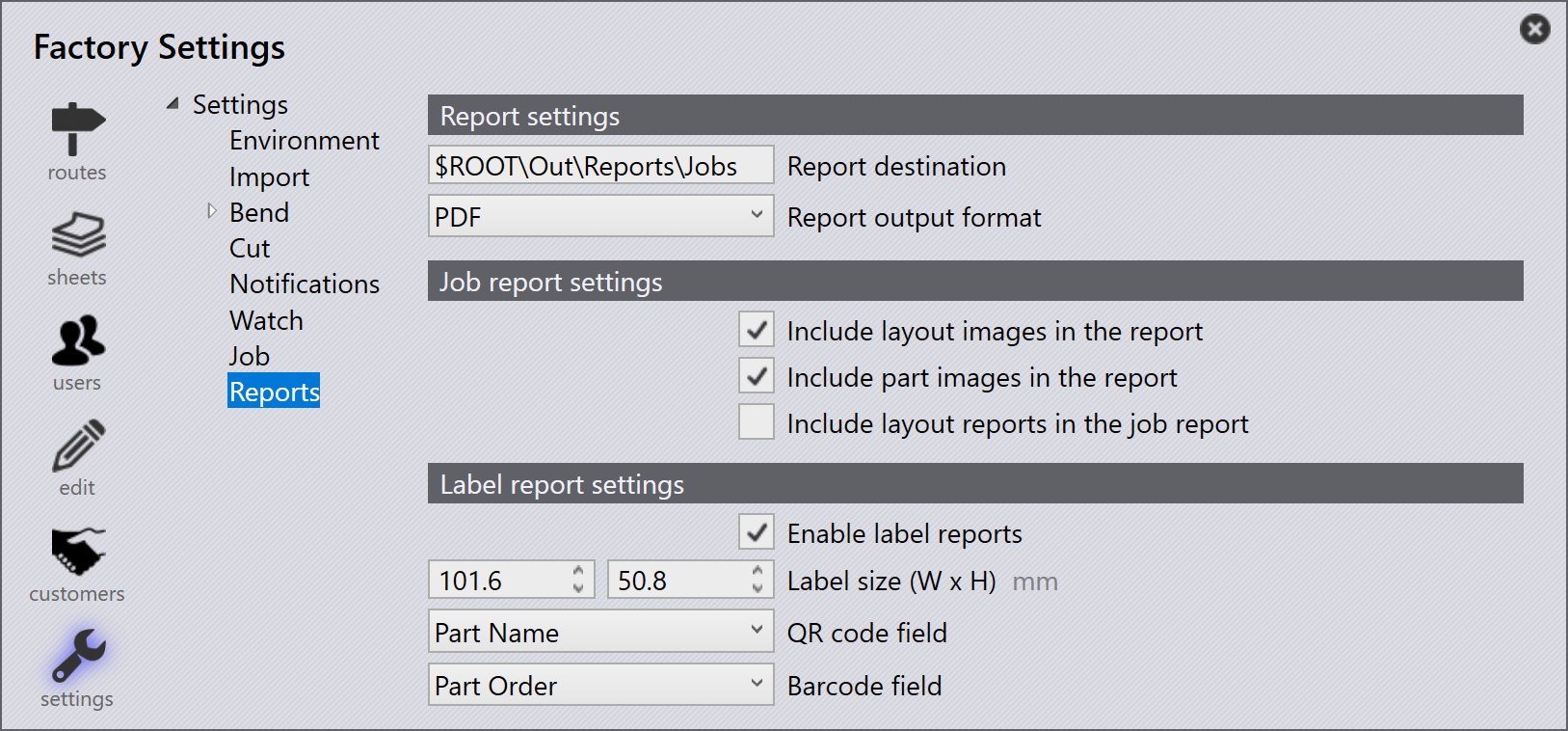
Report settings

Report destination - Use this option to specify the location to save the reports.

Report Output Format - Specifies the format of the report during export (PDF or HTML).

Job report settings

Include layout images in the report - Enable this setting to include images of the layouts in a report.

Include part images in the report - Enable this setting to include images of the parts in a report.

Include layout reports in the job report - Enable this setting to link to the layout reports inside a job report.

Label report settings

Enable label reports - Enable this setting to allow the generation of labels either from the job or a layout where right clicking and selecting Export Layouts or Send to Machine respectively will present an option to show the label report.

Label size (W x H) - Specifies the width and height of the label in millimeters. These values define the physical dimensions of the generated label.

QR code field - Defines the data field to be encoded into the QR code on the label. The drop-down list includes Part Name, Part Order, and None. The selected field value is displayed as a QR code.

Barcode field - Defines the data field to be encoded into the barcode on the label. The drop-down list includes Part Name, Part Order, and None. The selected field value is displayed as a barcode.

Show part image - When enabled, includes the part image in the generated label report.

Contents

  • Report settings
  • Job report settings
  • Label report settings
Job Impressum

      Copyright © 2025 TRUMPF Metamation. All rights reserved.

    Compiled by Bento